GO Locker 1.82

GO Locker 1.82
The lastest version has been mistaken for malware by 'Avast! Mobile Security'.
The lastest virus database version of 'Avast! Mobile Security' has fix this problem.
Users can enjoy GO Locker as usual without unsafe factors.Thanks!
GO Dev Team
Notice! Here comes the version of GO Locker.
====Features:
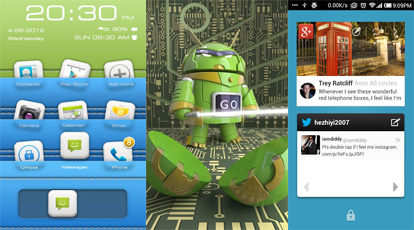
1. Cool Locker Screen that makes your phone outstanding;
2. Good compatibility with GO Launcher EX and it is stable;
3. Easy to use;
4. Able to activate phone, SMS and Camera directly or you can change the slider shortcuts yourself;
5. Various of Locker Themes to match your style;
6. Support customise wallpaper;
7. Security locker;
8. Emergency unlock enabled;

Lightning Browser 2.4.1

Lightning Browser 2.4.1
The Lightning Browser +
● The Most Powerful Web Browser of Its Size ●
PLEASE TRY THE FREE VERSION FIRST
Email me with problems, I don't always see the comments.
Features the free version doesn't have
● Unlimited Tabs
● Unlimited Bookmarks
Features:
● Holo Interface
● Supports Froyo to JellyBean
● Tabbed Internet Browsing
● Supports Adobe Flash Player
● Fast Start Times
● Small Footprint
● Fast Browsing, Faster than Chrome
● Bookmarks
● Smooth Scrolling
Enjoy Lightning Browser, one of the smallest browsers around. It is a high-performance small-sized browser built for those who don't want the cumbersome slowness or size of Firefox or Chrome. Email me with questions.
Navigation:
● Long-press the back button to exit the browser
● Long-press a link to open it in a new tab
● Check out settings for more options
Enjoy :)
Permissions Explanation
● permission.INTERNET - Obviously needed to access the internet :-P
● permission.WRITE_EXTERNAL_STORAGE - Needed for downloading files
● permission.READ_EXTERNAL_STORAGE - Needed for downloading files
● permission.ACCESS_FINE_LOCATION - Needed for sites that want your location (you can deny location access)
● permission.READ_HISTORY_BOOKMARKS - Needed for reading the browser history
● permission.WRITE_HISTORY_BOOKMARKS - Needed for keeping the browser history up to date

Falcon Pro 1.8.1a

falcon pro
 

Falcon Pro brings the Ultimate Twitter Experience to your Android Phone and Tablet.

Looking for a Twitter app with an Innovative UI, Buttery animations, Extra fast loading times and Unique Features ? Look no further, Falcon Pro is what you need.
* Double Sliding Menu UI like you've never seen before
* Beautiful Phone and Tablet UI
* Extra smooth scrolling
* Real Time, Expandable notifications
* Super fast internal browser with Instapaper integration
* Offline favoriting
* Tweet Drafts
* Inline preview of Photos and Videos
* TweetMarker support to use on multiple devices
* In-app preview of Play Store links
* Zoomable pics
* See your most popular tweets
* Fast access to Saved Searches and Lists
* Embedded Youtube player
* Dark & Light themes
* Inline preview for links and articles
* Offline access to your favorite users
* Individual user notifications
+ All core features you would expect from a mobile Twitter client


DarkJelly Theme Chooser "Root"

DarkJelly Theme Chooser "Root" 3.0

!!!!!!THIS IS NOT FOR LAUNCHERS!!!!NOTICE...THIS IS FOR ROOTED PHONES ONLY.....xHDPI & HDPI ONLY!!!
*********PLEASE READ ALL OF THIS***********
Before buying try DarkICE free also DarkJelly Lite free with only a few things themed.
****************I WILL NOT REFUND YOU**********
*****AGAIN THIS IS NOT FOR LAUNCHERS********
I cannot teach you how to root your phone or help you install the correct rom!!! Please do not use if your not rooted or don't have a rom with the theme setting...Thank you all for your support!
If you don't read this you can miss some good stuff!!!
Complaining about issues here will not help anyone!!!
********REBOOT AFTER APPLYING TO MAKE SURE EVERYTHING GETS APPLIED...even after updates**
************DO NOT MOVE TO SDCARD....WILL CAUSE ERRORS****
If you have no idea what that means then PLEASE DON'T DOWNLOAD!!!!!!
As you know if you try this I am not resposible for you NOT backing up or your phone gets so sexy someone steals it!!!! Not my fault!!!!! :-)
Please Email me with questions...I CANNOT REPLY TO REQUESTS and ISSUES HERE...EMAIL ME PLEASE!!!!
Instructions:
1. Backup in recovery
2. HEY...did you back up?
3. Make sure you are on ONLY JB CUSTOM roms that includes the THEME option!
4. You backed up right? Ok just checking!
5. Download and install this app from the market
6. Go to menu/settings/themes/ select DarkJelly and apply....KNOWN ISSUE...
YOU WILL GET AN ERROR ABOUT ASSETS AND SCREEN SIZE BLAH BLAH...THAT IS NORMAL...SELECT APPLY ANYWAY.....ONCE DONE REBOOT!!!!
*************If you get an error the theme in not compiled correctly just apply the stock theme and reboot...apply DarkJelly and reboot...all will be good!!!*********
7. Enjoy the Darkness!!!
If system popup has an error after booting select WAIT!!! All will be good, my theme is huge!!
Want some Jelly Wallpapers?
Go here and get the theme chooser wallpaper app:
"Theme Chooser Wallpapers" - http://bit.ly/LiFhfE
Note: Jelly theme must be applied to see the wallpapers in the app.
Included apps in apk:
Browser
Calculator
Camera
Contacts
DeskClock
Development
Exchange email**
Keyboard
Phone
Download Providers
Quick Search Box
Settings
SystemUI
Vending**
DSP Manager
Trebuchet
Facebook**
Google Plus Icons**
Gmail Notify only**
Google Quick SearhBox
RomManager
Gtalk Notify **
Astro File manager
Terminal
File manager
Rom Manager
Apex Launcher
NOVA Launcher
ADW Launcher
ADW EX Launcher
XDA /XDA prem
Rootzwiki Prem
Theme Chooser wallpaper app
Plume "Select Dark Theme" **
Handcent ** (choose Hero Skin)
Rom Control Icon
LockScreen Widget
DropBox Icon
Voice Search Icon
OverClock Widget and Icon "select DARK background"
Super User
Pinger Text free
QuickBoot
WordPress Icon
VideoEditor Icon
MMS Icon
Gmail Icon
Gtalk Icon
Calendar Icon
weather Icon
Apollo Icon
Youtube Icon
Voice Dialer Icon
Instagram Icon
Rootzwiki prem Icon
SU Icon
Facebook messenger Icon
NetFlix Icon
SWYPE BETA ONLY
Google Play Icon
Goo manager Icon
Reader Icon
Rom toolbox Icon
Play Music
FlashPlayer Icon
Issimo Icon
Root Explorer Icon
Books Icon
PayPal Icon
Pandora Icon
Su File Manager Icon
Gallery
Camera
Solid Explorer
PowerToggles
Maps Icons
Google Ears
WhatsApp Icon
ESPN Score Center Icon
ESPN Fantasy
Football Icon
Tapatalk
Google Earth Icon
SkyMap Icon
Google Translate Icon
Google Drive
GoSMS Icon
more...
** Have Animated Notify
Inside the Inverted apps zip: Found on my site here:
DarkJelly - has mms black font fix!!!
http://jbthemes.com/djdarkknight/darkjelly/
DarkICE
http://jbthemes.com/djdarkknight/darkice/

All original gingerbread/ICS audio files with the jelly bean ones too
DarkJelly Bootanimation
Inverted apps:
-Apollo Music
-Calendar
-Email
-Weather Widget
-Gmail
-MMS with avatars, bubbles and emoji
-PlayStore
-Google Now
-Gtalk
-Google Videos
LAST BUT VERY IMPORTANT>>>>>>>>>>>>.........ENJOY


Music Player (Remix)

Music Player (Remix) 1.3.0

 Music Player (Remix) is an advanced music app for Android designed from the ground up to be powerful, yet user-friendly and fun to use.

The app has a large assortment of features, many of which you won't find in any other music app. They include:
- Large, finger-friendly controls on phones and tablets. Tap the album art to pause/play & skip tracks.
- While using other apps, swipe from the bottom of the screen to reveal the "mini-player" allowing you to control your music & access your now playing list, playlists, and faves without leaving other apps.
- Add new songs to your device and the app will issue a notification which when tapped will start playing those songs.
- From anywhere within the app, swipe from the bottom to reveal music controls and the Now Playing list.
- From anywhere within the app, swipe from the right side to access your music library, search function, help, preferences, and aesthetic options including wallpaper & menu color customization.
- From anywhere within the app, swipe from the left side of the screen to access your faves (one-touch access to songs/albums/artists), playlists, and autolists (auto-generated playlists based upon your listening habits).
- 5 customizable quick shortcuts are available on the Now Playing screen. Assign various functions to each one included Add to Playlist, Save bookmark, Lyrics, Share song, View YouTube video, and much more.
- All screens are optimized for portrait & landscape orientations.
- The Now Playing screen has been optimized for 7" & 8.9"/10" tablets.
- All library browsing screens have several display & sorting options.
- Save bookmarks in a song & visual markers will appear on the scrubber bar. Tap prev/next to jump between bookmarks or use the "View Bookmarks" option to select a bookmark.
- Any time you play a song, a bookmark is automatically saved when you leave the song. To go back to the previous play position in a song, use the "View Bookmarks" option.
- Download album art for any song or album. Select from several choices with different image resolutions. Album art is embedded directly in the music files.
- Download lyrics for a song which are embedded directly in the music file (or optionally saved in an external text file). Pinch/zoom the lyrics to change the font size. Feel like singing along? Use the karaoke feature to record yourself as you view the lyrics.
- Advanced playlist management including drag/drop song re-ordering & multi-add mode. While in multi-add mode, go to any screen within the app and tap songs/albums/artists/genres/composers to quickly add them to the playlist.
- When viewing an artist, swipe between the song list, the album list, and the artist's wiki page. Wiki options are also available for albums, genres, and composers.
- 5 band equalizer with built-in presets, bass boost, and virtualizer.
- Last.fm scrobbling with caching during internet outages (no external app required).
- Stylish 4x1 & 4x2 home screen widgets with customizable color & opacity.
- Various lock screen control options including basic controls (ICS+), advanced mini-player controls (ICS+), or the 4x2 widget (Android 4.2+)


Holo Countdown

Holo Countdown 3.0.6.1

Holo Countdown is a beautiful countdown app designed to be as efficent, fluid and easy as possible while still packing loads of features. The app has been carefully designed to look good on any device, no matter if it's a tablet or a phone. With the easy-to-understand interface you'll be able to see and manage all your countdowns instantly. There's also a widget which can be placed on your homescreen or lockscreen making it easy for you to see how many days your next event is.
Icon is by Taylor Ling, more of his work can be found here
With the free version you are limited to 2 countdowns at a time, no widget and no online sync.
If you want to you can view how many seconds and hours are remaining on a countdown, add it to your calendar, share it and edit it on the go. Send us an email if you have any suggestions or problems.