NotifierPro Plus 7.8


With NotifierPro you can greatly improve the way your device displays notifications.

« NotifierPro really does make Android's notifications better », Lifehacker (May 2012)
« NotifierPro is unique », AndroidSpin (May 2012)
« If you're looking for customizability, this is it », Android Police (Apr 2012)
« NotifierPro makes your notifications even better », Tested.com (May 2012)

NotifierPro displays non-intrusive notification banners for any app on your device.
You can swipe the notification to the right to dismiss it, to the left to dismiss all notifications, or click it to launch it.
Numerous themes are available.
** Developers :
- You now have the possibility to develop and publish themes for NotifierPro. More information : http://www.productigeeky.com/themes/
- NotifierPro now includes an API with the ability for developers to raise notifications through


LockerPro Lockscreen


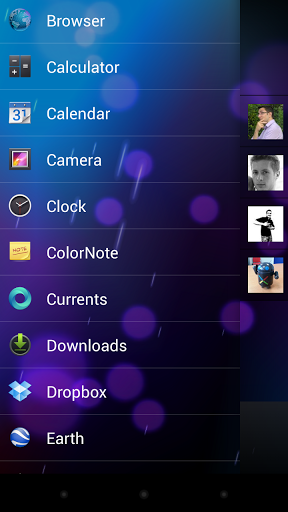
A simple and clean lock screen with notifications for your Android device.

« LockerPro Lockscreen for Android Puts App Notifications Right On Your Lock Screen », Lifehacker (December 2012)
« LockerPro is the nicest Android lock screen replacement I've come across », PhoneDog (December 2012)
« LockerPro Lockscreen is a great app that implements notifications really elegantly », Redmond Pie (December 2012)

Try the smartest lock screen for Android !
LockerPro allows you to check your notifications without unlocking your device.
LockerPro monitors notifications coming from any app on your device, and displays them as banners on your lock screen. You can easily swipe them away by swiping them to the left, or launch the notification by swiping to the right.
LockerPro also provides an app launch panel and a widget panel. Simply swipe the screen from the left to access the app launch panel, and from the right to access the widget panel.


System Monitor 1.1.06


The most beautiful and versatile System Monitor for Android! This application provides real time system load statistics and important information in the form of text and fancy graphs.
It is a bundle of 6 in 1 where you are able to monitor CPU, RAM, I/O, Network, Apps and your Battery so you are actually paying for 6 applications together in a single one!
Comparing to the Lite version this application unlocks monitoring in the forms of:
- Notification bar
- Floating apps
- Widgets
- DashClock lockscreen widget extensions
Grasp the full power of customization and configure features, such as:
- The algorithm you prefer the most for calculating the remaining battery time;
- The update interval of real time monitoring, in order to spare system resources;
- Monitor total CPU usage or individual CPU cores (if your device has more than 1 CPU core).
WARNING: Expanded notifications only works on Jelly Bean+ due to API limitations.
Misc:
- Help translating! https://crowdin.net/project/system-monitor
Graphics:
- Feature graphics made by www.johnxde.com #
Permissions explained:
- DRAW OVER OTHER APPS: This permission is needed in order to display the floating app option.
- RUN AT STARTUP: This permission is need in case that you want your notifications to start on boot.


Status Bar Magic PRO 1.0.72

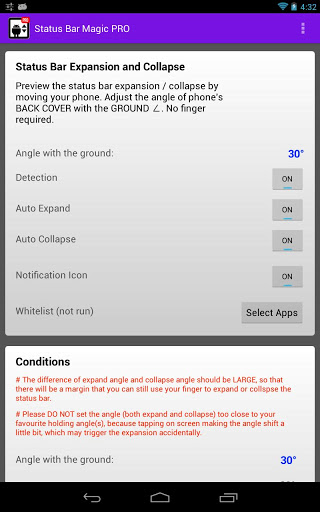
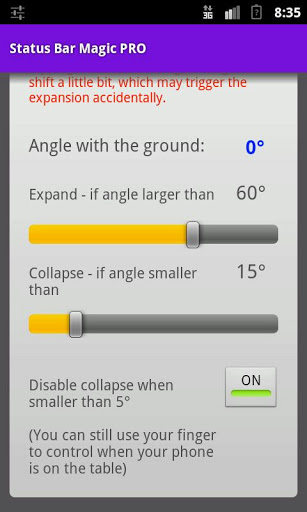
This expand and collapse the status bar (or notification center) automatically, by detecting phone's back cover angle with the ground. Users can see latest information of their phone, without pulling down the status bar by fingers. It detect of angle with the ground, and trigger expansion and collapse of the status bar.Because of the large screen size, pulling down the status bar could be tedious and difficult sometime. It can also help you to keep your screen clean because auto pull-down do not require touching of screen. If you have a large screen, you will love this app.
To summarize, it collapse and expand (open / close) your status bar without touching your screen.


Gravity Screen Off Pro 1.39


Using your phone often? Tired of the On-Off switching?
This app turns automatically your screen OFF when you put your phone into your pocket or onto a table and turn the screen ON when you take it out or up. No need to touch any button and you are ready to go.
HOW IT WORKS:
It monitors the orientation of the device through the gravity sensor. When your phone is pointing downward by its top, in a certain angle, it's likely to be out of use. In this situation the proximity sensor is activated to determine if it is covered. If yes, the screen turns off because probably you placed the phone into your pocket or onto a table.
To keep the battery usage low the program turns on the proximity sensor only when it's really necessary. Moreover, when it turns off your screen and the proximity sensor is covered it puts your phone into deep sleep state to save as much energy as possible.
MAIN FEATURES:
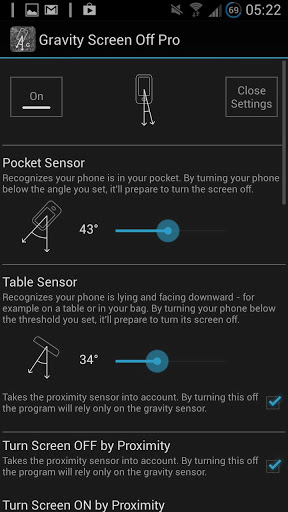
- Pocket Sensor: Recognizes if your phone is in your pocket. By turning your phone below the angle you set, it'll prepare to turn the screen off.
- Table Sensor: Detects your phone is lying on a table and turns the screen off.

- Turn Screen Off by Proximity: If the device is pointing downward it takes the proximity sensor into account.. By turning this off the program will rely only on the gravity sensor.
- Turn Screen On by Proximity: Turns the screen On when you take your phone out from your pocket and Off when you put it back. By swiping your finger over the proximity sensor the phone can be woken up as well.
- Turn Screen On by Motion: If the screen is off and it's facing up the device can be woken up by any movements (ex. lift up by hand) according to the sensitivity set.
- Keep Screen On by Motion: It's a Screeble like feature but it's relying on the small movements you are doing by your hand while holding the phone. If small motions are detected while the screen is facing up the feature keeps the screen on because it can be suspected that the phone is held and probably you are reading something long. If the phone is steady the timeout will work as normal in any position you leave your device.
BATTERY USAGE:
It should be not significant. I experienced about 5 per cent extra consumption on the test device. However it can vary over different devices.
MIN. REQUIREMENT:
To get this app work, your phone should have gravity and proximity sensor.

On tablets it will work only in limited mode due to they do not have proximity sensor.
UNINSTALL:
From the app: press Menu button of your phone -> choose Uninstall
SIDE NOTE:
- The app was not widely tested. Hopefully it will work fine for you. But, if you experience any issue or just have a question, please email me.
FAQ
Q: The screen not always turns off when I put my phone into my pocket, why?
A:The proximity sensor not always accurate. It can fail recognizing some materials specially if they are very close to it. If it happen occasionally, probably it's still worth to use the sensor. If it happens to you too often, you can turn off the Turn Screen On by Proximity feature. By doing this the screen will still turn back on but it'll use from now the Turn Screen On by Motion feature which cost little bit more energy.
Q: I'm experiencing high battery usage, why?
A: The app should use about 5 percent extra energy per day if you are not using too much the Turn Screen On by Motion feature, for example keeping your phone face down when it's on a table. Moreover, please, keep in mind that the android en-built battery consumption measurement can show much higher results if it's based on a short period of time.


Spirit FM Unlocked 2013 04 21


Spirit FM Radio is a real, tuned, "over the air" FM radio app. It is NOT a streaming app which requires expensive data plans and drains your battery.

No FM Support: US/LTE Galaxy S/S2/S3/Note/Note2 and many others are not capable of FM. US carriers are not allowing FM unless they can "monetize" it: http://forum.xda-developers.com/showpost.php?p=36567961&postcount=5154
Please email me at mikereidis@gmail.com at any time to upgrade for the price difference, cancel, or for ANY problems or questions.
Satisfaction guaranteed or full refund. Cancel any time on request. Try as long as you need. The 15 minute rule does not apply. I have cancelled orders over a year old, but that's mostly for Light to Unlocked upgrades for the price difference.
Spirit is mostly for Android enthusiasts who "root" & "ROM" their phones. But it also works on many stock, "store bought" phones, with or without a stock FM app.
On supported devices, Spirit is the only FM app supporting all these digital audio features:
- A2DP Bluetooth headset support.
- CD quality stereo recording.
- Internal Waveform and FFT frequency visualization with accurate 5 dB times 1 octave grid, from 43 Hz to 22 KHz.
- External visualizers, equalizers and effects.
Digital supported on: rooted International Galaxy S/S2/S3/Note/Note2/Player, rooted HTC OneXL/OneS/Evo 4G LTE/Xperia T and most stock Sony 2012-2013 devices.
Spirit includes:
- Personal & Fast tech support for all devices you own from me, the developer, proprietor and only "employee". :) For problems, use Menu-> Test-> Email-> Logs & after 20 seconds press Send.
- Digital audio features on supported devices (see above): Bluetooth, Record, Visualization, Equalizer & Effects.
- RDS data display in App, Lock-screen & Notification window. RT, PS, PTY, PI & AF RadioText RT, Program Service PS, Program Type PTY, Program ID PI & Alternate Frequency AF.
- Lock-screen & Wired Headset Media Button support for mute, preset, seek, volume & record.
- Many settings: Audio, UI, AF, Digital & Debug categories.
- Unlimited Presets & Preset Lists.
FAQ / Frequently Asked Questions: http://forum.xda-developers.com/showthread.php?p=31983089
I understand the price may seem high, but this is a niche app with a high tech support burden. The gracious support of customers keep Spirit alive and improving.
How many other "Real FM Radio" apps are on Google Play ? Two: 1 for Galaxy S only and one repackaged Motorola app.
Why ? Because Android FM is extremely difficult. Google doesn't support FM radio and carriers suppress it. Intensive reverse engineering is required. In the over 2 years since Spirit was first created, nobody else has been "crazy" enough to attempt to compete in this niche. :)
Spirit is not a throwaway game app you play for a few days. How many hours will you spend listening to FM radio in the next several years ?
How much can you save on data plans by listening to free, over the air radio versus streaming ?
If you care about app quality, note CNet article "We're not paying enough for apps": http://forum.xda-developers.com/showpost.php?p=23568502&postcount=2523
Spirit is not a one time purchase. It's ongoing technical assistance, fixes, new device support & features.
I'm one developer and Spirit FM Radio is my only app and income. I'm trying to do a job Google said they couldn't for lack of developer resources. :)
I personally answer every email or post on my XDA thread, usually within 12-24 hours, 7 days a week.
Your support will help keep Spirit FM Radio alive and improving.
For tons of further info, and links to free test versions, please see my XDA thread for Spirit FM Radio: http://forum.xda-developers.com/showthread.php?p=13385163