TSF Shell pro 1.9.9.3


TSF Shell is a unique graphical user interface experience for Android
OS. This premium home screen replacement allows for endless possibilities
as you personalize your widgets and home screens. Say goodbye to the
boring, traditional Android interface!
For more information about TSF Shell release history and to view the demo
of all versions please visit the following link:
http://www.tsfui.com/shell/release_history.html You really do need to see
this product in action to truly understand its unique capabilities!
Features:
========================
*Multiple operations such as auto-arrangement, multi-item selection, adding
to folder, and multi-deleting can be quickly done by only one finger
gesture.
*Folders can be utilitized in various ways.
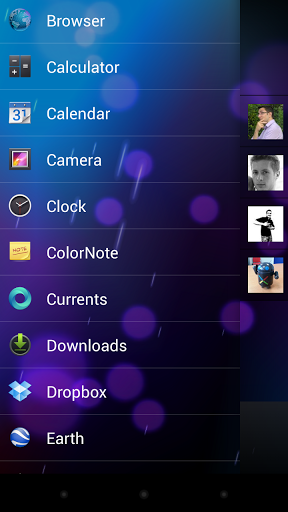
*TSF Shell has an APP page (drawer) in addition to 4 home screens. You can
switch between homescreens by traditional swiping, or by utilizing the one
click switcher in the lower corner. When mastered, this gesture-like
homescreen switching becomes natural, and is much faster than swiping
across screens.
*Quickly create multiple app shortcuts and drag them to any page at once.
You can then distribute the app icons freely on the page, and can even
change the angles of the shortcuts. The arrangement and design is up to
your imagination!
*The side column provides access to most of TSF Shell's widgets, folders,
contacts, weater, settings, and other app shortcuts of your choice.
*Side column can be completely personalized with your own shortcuts, it can
also be auto-hidden (viewable by swipe gesture).
*Powerful theme function. In addition to stylistic changes, themes can even
allow for transistion animation changes.


MX Player Pro 1.7.15a


THIS IS THE AD-FREE VERSION OF MX PLAYER.
MX Player - The best way to enjoy your movies.

a) HARDWARE ACCELERATION - Hardware acceleration can be applied to more videos with the help of new H/W decoder.
b) MULTI-CORE DECODING - MX Player is the first Android video player which supports multi-core decoding. Test result proved that dual-core device’s performance is better up to 70% than that of single-core devices.
c) PINCH TO ZOOM - Easily zoom in and out by pinching and swiping across the screen.
d) SUBTITLE SCROLL - Subtitles can be scrolled to move back and forth faster.
e) KIDS LOCK - Keep your kids entertained without having to worry about them making calls or touching other apps. (plugin required)
f) ANDROID 4.2 - Fully supports Android 4.2 Jelly Bean MR1.

Subtitle formats:
- DVD, DVB, SSA/ASS Subtitle tracks.
- SubStation Alpha(.ssa/.ass) with full styling.
- SAMI(.smi) with ruby tag support.
- SubRip(.srt)
- MicroDVD(.sub/.txt)
- SubViewer2.0(.sub)
- MPL2(.mpl/.txt)
- PowerDivX(.psb/.txt)
- TMPlayer(.txt)


Touch Control Nexus 4.1.6h


*** ROOTED NEXUS 4 DEVICES ONLY ***

==== PLEASE NOTE THAT WITH ANDROID 4.2.2 THIS WILL ONLY WORK WITH CUSTOM KERNEL ====
==== YOU CAN GET MODIFIED STOCK KERNEL HERE: http://forum.ponury.net/viewtopic.php?f=14&t=1033 ====
This is a kernel module for Nexus 4 that allows us to wake phone (just like power button) by a swipe gesture on the screen. So it's slide2wake or slide2unlock. It also allows locking and so on. Please see the video.
Any bugs and requests should be made on the official forum: http://forum.ponury.net/ you could check my other apps there.
****** PLEASE NOTE THAT THIS IS BETA AND MIGHT NOT WORK ON CUSTOM KERNELS ******
TO UPDATE PLEASE DO THIS:
1) UNINSTALL COMPLETELY THE APP
2) REBOOT DEVICE
3) INSTALL A NEW VERSION

Press Google Reader 1.2.1


Attention: Even though Google Reader will shut down on July 1, Press will migrate over to a new backend syncing solution before that date. We'll provide details with our migration plan when that's ready. We love Press and we're going to keep making it better!


Press is a Google Reader app that is all about the reading experience. It has been designed with the purpose of making your news easier to read. Quickly move from screen to screen and effortlessly manage the articles you want and the ones you don't.


We designed an app that we want to use and hopefully our attention to detail will be evident on every page.


Note: This app requires a Google Reader account to sync your RSS subscriptions.


Features:
- No ads
- Syncs with Google Reader
- Widgets (Lockscreen support for 4.2+)
- Readability integration
- Vertical or horizontal swiping to navigate articles
- Background syncing (with notifications)
- Quickly mark articles as read/unread
- Offline reading support
- Clean reading environment
- Image zooming
- Change reading font style and size
- Article text alignment
- Share the articles you read or star them for later
- Open articles in the app or your default browser
- YouTube API support
- DashClock extension


Details:
- Press the favicon to next to an article to "fast mark" the articles as read/unread
- Long-press the favicon to have the option to mark all older articles as read
- When reading an article, double-tap any image to get a closer look
- Also, tap the article title to read it in the browser


NotifierPro Plus 7.8


With NotifierPro you can greatly improve the way your device displays notifications.

« NotifierPro really does make Android's notifications better », Lifehacker (May 2012)
« NotifierPro is unique », AndroidSpin (May 2012)
« If you're looking for customizability, this is it », Android Police (Apr 2012)
« NotifierPro makes your notifications even better », Tested.com (May 2012)

NotifierPro displays non-intrusive notification banners for any app on your device.
You can swipe the notification to the right to dismiss it, to the left to dismiss all notifications, or click it to launch it.
Numerous themes are available.
** Developers :
- You now have the possibility to develop and publish themes for NotifierPro. More information : http://www.productigeeky.com/themes/
- NotifierPro now includes an API with the ability for developers to raise notifications through


LockerPro Lockscreen


A simple and clean lock screen with notifications for your Android device.

« LockerPro Lockscreen for Android Puts App Notifications Right On Your Lock Screen », Lifehacker (December 2012)
« LockerPro is the nicest Android lock screen replacement I've come across », PhoneDog (December 2012)
« LockerPro Lockscreen is a great app that implements notifications really elegantly », Redmond Pie (December 2012)

Try the smartest lock screen for Android !
LockerPro allows you to check your notifications without unlocking your device.
LockerPro monitors notifications coming from any app on your device, and displays them as banners on your lock screen. You can easily swipe them away by swiping them to the left, or launch the notification by swiping to the right.
LockerPro also provides an app launch panel and a widget panel. Simply swipe the screen from the left to access the app launch panel, and from the right to access the widget panel.