Next Launcher 3D 1.28.1

$15.99 BUY
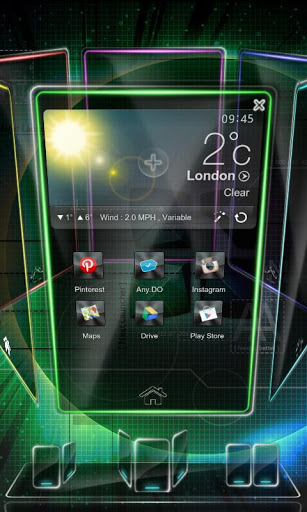
No.1 Grossing 3D Launcher. Next Launcher 3D shows how 3D, dynamic and highly customizable home screen replacement app could redefine your Android Launcher -- Extend imagination, extend capabilities. Embrace the next generation of user interface to your phone!
Features
* Stereoscopic Screen Preview
Stunning 3D screen preview with dazzling animation of screen switching enables you to access to, add, set home screen, and delete any screen in a second.
* Multi-select Apps
After selecting one app, use sliding gesture to multi-select the other apps. The fantastic interaction designs not only to wow people, but save efforts to fulfill batch operation on Android launcher home.
* Customizing Home Screen
Packed with unlimited screen layout function, you may place icons, folders, or widgets randomly on your screen. Change 3D themes and wallpapers to reclaim your launcher home interface.
* Icons
Icons support rotation, replace, Multi-select, align and so on. Operation is easy and fantastic. Multi-select apps, long press one of the selected apps to gather them, and draw a preview path by selecting operation from app icon menu.
* Rotatable Dock
Invert the dock upward or downward to switch among Android launcher home, preview and editing modes.
* App Drawer
Icons can be arranged by name or time. You can create folders by overlapping app icons. That batch operation to add icons on Android home is also available

Hell Yeah Pocket Inferno 1.0

$0.99 BUY
The devilish creator of the award winning console game, Hell Yeah! Wrath of the dead Rabbit, winner of best download game and best indie game in Destructoid’s ‘Best of E3 2012’ awards – brings you Hell Yeah! Pocket Inferno.
You are Ash, a devil rabbit and the prince of Hell .Tool up with the meanest weapons, the scariest masks and craziest wheels to defeat the ugliest monsters. Hell Yeah! is a crazy action-adventure side-scroller set in Hell.
This is the perfect on-the-go companion for dressing up a psychotic rabbit (Ash) in ridiculous masks and shooting gruesome monsters. In Hell Yeah! Pocket Inferno, you ride an awesome jetpack driller, avoid deadly obstacles, fire kick-ass weapons, exterminate ugly monsters, collect gold, level up, unlock collectibles and complete missions across the crazy worlds of Hell Yeah!
• The simplicity of two button gameplay.
• 60 unique levels set in 6 different worlds.
• Avoid obstacles whilst thrusting through the game in the high-speed jetpack action.
• Break through walls and kill monsters using cool weapons including a machine gun and a rocket launcher.
• Defeat more than 30 monsters and collect their tokens
• Collect gold and unlock 50 new masks and jetpack skins!
• Find the Doom Token hidden within each level to unlock secret areas
• We’ll keep adding new content to Hell Yeah! Pocket Inferno. Stay tuned!


Falcon Pro for Twitter 1.8.2

$1.86 BUY
Falcon Pro brings the Ultimate Twitter Experience to your Android Phone and Tablet.
Looking for a Twitter app with an Innovative UI, Buttery animations, Extra fast loading times and Unique Features ? Look no further, Falcon Pro is what you need.
::::: Falcon Pro Features :::::
* Double Sliding Menu UI like you've never seen before
* Beautiful Phone and Tablet UI
* Extra smooth scrolling
* Real Time, Expandable notifications
* Super fast internal browser with Instapaper integration
* Offline favoriting
* Tweet Drafts
* Inline preview of Photos and Videos
* TweetMarker support to use on multiple devices
* In-app preview of Play Store links
* Zoomable pics
* See your most popular tweets
* Fast access to Saved Searches and Lists
* Embedded Youtube player
* Dark & Light themes
* Inline preview for links and articles
* Offline access to your favorite users
* Individual user notifications
* Scrollable widget
* Quick Actions widget
* Full offline mode !
+ All core features you would expect from a mobile Twitter client, and much more.

Windows8 Launcher pro 1.5


Windows8+ is Home launcher application which tries to provide Windows8 mobile like experience on your android device.
New in V1.5 :
-Updated tablet layout with possibility to swap every tile from Menu >> Tile(not live tiles yet)
-Ability to change default tile action/image (call, message, etc)
Key features:
1)Live tiles for gmail, news, weather, twitter, calendar , etc with many configuration options
2)Drag and drop tile groups to re-order/change the position of tiles.
3)Change icon/tile icon size using Menu >> Icon Size
4)Select the preferred country for news using Menu >> Prefs >> News Country and for stock market using Menu >> Prefs >> Stock Market
5)Power Control widget to on/off Wifi, Airplan mode, Bluetooth, ring mode, screen brightness, etc.
6)Click on icon/tile will bring up (launch) the associated app, (This application will try to associate most common applications like dialer, messsage, google play, etc) if you are clicking first time and no application is associated then list of all installed apps will be opened and you can associate any app of your wish to this tile.
7) Long Click on icon/tile to change the color, icon, application associated to tile. Following 3 options are available\n * Associate App - Change the launching app while keeping the same icon on home screen.\n * Change Color - Change background color of tile.\n * Change App - Change the launching app and icon will be replaced with app default icon on home screen.
8)Additional icons/tiles style which can be customized as per your need. Add/remove tiles from Menu >> Tiles
9)Weather Service : Based on your current location, local weather details are available.
10)Stock Market updates : Select your preferred Stock Market using Menu >> Misc >> Stock Market
New in V1.4.1 :
-News in multiple languages
-Performance enhancements
-Color theme for tiles (same color for all the tiles)
New in V1.4 :
-Tablet support with portrait and landscape mode
-Weather live tile with forecast for next 3 days
-Calendar defect fix
What is new in V1.3.2 :
-Wifi only tablet support
-Prefs enhancement : Multiple font sizes for live tiles
-Message(SMS) tile defect fix
-Stock Market tile enhancements
What is new in 1.3.1
-Tiles re-order : Menu >> Tiles >> Change order - Drag and drop the tile group to re-order (change position)
-Weather update : option to select unit of temperature
-Clock update : option to select 12h or 24h clock
What is new in 1.3
-Menu changes with new preference page (easy access to live tiles settings)
-Calendar defect fixes
What is new in 1.2.3
- Live tile defect fixes
What is new in 1.2.2
-Weather defect fix
-Add/Remove tiles defect fix
What is new in 1.2.1
-Menu >> reload to reload all live tiles
-News tile click to open detail page
-Icon size based on screen resolution
-Calendar defect fixe (Still BETA)
What is new in 1.2
- Support for Wifi and 3G tablets
- Live tiles enhancement
What is new in 1.1.2
- Twitter defect fix
What is new in 1.1.1
- New Calendar Live tile (It is BETA so please send your feedback to help me improving the tile)
What is new in v1.1:
- Performance enhancements
- Weather defect fix

HD Widgets 3.9.5


♥ NEW Colourform widget pack now available! ♥
"Android users swear by the HD Widgets app" - The Guardian
"Amazingly awesome and beautiful" - Android Community
"elegant and eye-catching" - Computerworld
"heavy on polish and detail yet light on the wallet" - AndroidGuys
Top 10 Android Apps - Techcrunch
Editor's Choice - Google Play 2012
* * * * * * * * * * * * * * * * * * * * * *
PERMISSION INFO:
** Full details: http://cloud.tv/i/hdw-perms
** camera: to use the LED camera light

KNOWN ISSUES:
- OS 4.2: Reboot during reinstall is an OS bug, affects all apps showing lock screen widgets
- OS 4.2: lock screen widgets don't delete from app is OS bug, see below*
- App2SD users: widgets don't work on SD cards
- OS 2.x devices: you may need to restart to see widgets show up

* using "Remove" will remove widget from screen, but won't delete widgets from the system (OS bug). You'll also need to manually delete in our app > Active Widgets > More (bottom right)
** 3RD-PARTY LAUNCHERS / ROMS **
Make sure they're using the latest sdks. Old sdks are not fully compatible with new devices. We recommend:
Phones: Apex, Nova, Holo, ADW, SPB Shell
Tablets: Apex, Nova, Holo
Changing device grid size, resolution, firmware/rooting may affect performance.
We don't test ROMs!

** FAQ: http://cloud.tv/hd-widgets/faq/
recommended:
Dual-core 1.2 GHz
Android OS 4.0 (ICS)
xhdpi / hdpi / tablet screen
minimum:
800 MHz
Android OS 2.3
mdpi screen

★ Anything else? Got ideas? Please tell us: hi@cloud.tv
♥ We respond to everyone!
* * * * * * * * * * * * * * * * * * * * * *

♥ NEW Colourform widget pack now available!
♥ Over 50 more Jellybean style widgets!

Recently Added in HD WIdgets:
- moar widgets
- massively vivid easier-to-use app UI
- WYSIWYG widget previews
- new clock widgets
- customizable switches
- more weather services
- local date & time in weather screen
- multi-location weather screen
- choose weather hotspot link
- device specific User Guide
- show/hide widgets in the main menu
- more switches
- even more colors & clocks
- built for new themes & add-ons
- ICS native (built on sdk 17)
UNIVERSAL app made for tablets and phones! No need to purchase again =)
HD Widgets are the next generation of widgets - something fun and amazing designed for today's high resolution touch screens.
HD Widgets includes a dozen beautiful widgets that show current time, current weather, weather forecast, and utility switches. We put a TON of time into designing each widget to look great on every Android screen.
The best part of HD Widgets is how fun and easy it is to use. Everything in the WYSIWYG app is right at your fingertips. make changes and see the results instantly right on your wallpaper background. You can mix and match various clocks (LED, flip clock, and Honeycomb) with backgrounds, layouts, and other options. Simple!

Widget Features
- over 100 amazing, beautiful widgets for all device types
- organized by sizes
- clock, date, location, weather, forecast, & utility switches
- LED, flip clock, & Honeycomb clock designs
- vivid colorful backgrounds
- large made-for-tablet widgets
- hot spots for alarm clock, calendar, & weather
- phone widgets: 1x1, 2x1, 2x2, 4x1, 4x2, 4x3, 4x4 (& 5x sizes for the Galaxy Note)
- tablet widgets: all phone sizes plus 8x1, 8x2, 4x7, 6x1, 6x2, & 3x5
App Features
- User Guide to help you get started
- fullscreen weather activity
- multiple locations and weather services
- fun & unique WYSIWYG design
- quick and easy editing
- widget & theme previews
Options
- AccuWeather, WeatherBug & Weather Underground
- 12 / 24 hr clock
- F / C temperature

Bike Race Pro 2.3.2


This version of Bike Race has:
- All levels unlocked!
- No Ads!
In this simple and fast-paced physics-based free game, tilt your device to lean your bike and touch the screen to accelerate/brake.
Features:
- Multiplayer
- Simple controls
- 12 addictive worlds
- 96 challenging tracks
- 13 amazing bikes
- Touch to accelerate, tilt to lean the bike
- Cool stunts
Bike Race is brought to you by Top Free Games - the creators of the #1 game in the google play store, Racing Penguin.
Multiplayer Mode is available! Try to become the best biker on Android!
A few words from our fans:
"This is the funnest bike game in the history of bike games"
"This game was so much fun I lost my job and my wife left me. I sure
hope they will reimburse me for my life."
"Fantabulous"
"Hide this one from the kids, you're gonna want to spend some quality
time playing this one yourself!"
"This game changed my life"
"I have had this game for a couple months very good game constant
level updates love it thanks."
"If it where a 10$ game i would buy it"
"I can play it everyday for the rest of my life"
"Great 2 player. Similar to words with friends but so much better!"
"Bike Race is the best game I have ever played in my life."
"Fun fun fun!!! Best motorcycle game in the world"
"I don't know if it is a kids game, but I play more than my kids! Really cool game"
Bike Race.