Windows 8 +Launcher v1.5.1 Apk

Windows 8 Launcher
Windows 8 +Launcher v1.5.1 Apk

Required Android O/S : 2.2+

Features:
  • Live tiles for gmail, news, weather, twitter, calendar , etc with many configuration options
  • Drag and drop tile groups to re-order/change the position of tiles.
  • Change icon/tile icon size using Menu >> Icon Size 
  • Select the preferred country for news using Menu >> Prefs >> News Country and for stock market using Menu >> Prefs >> Stock Market 
  • Power Control widget to on/off Wifi, Airplan mode, Bluetooth, ring mode, screen brightness, etc.
  • Click on icon/tile will bring up (launch) the associated app, (This application will try to associate most common applications like dialer, messsage, google play, etc) if you are clicking first time and no application is associated then list of all installed apps will be opened and you can associate any app of your wish to this tile.
  • Long Click on icon/tile to change the color, icon, application associated to tile. Following 3 options are available\n * Associate App - Change the launching app while keeping the same icon on home screen.\n * Change Color - Change background color of tile.\n * Change App - Change the launching app and icon will be replaced with app default icon on home screen. 
  • Additional icons/tiles style which can be customized as per your need. Add/remove tiles from Menu >> Tiles
  • Weather Service : Based on your current location, local weather details are available.
  • Stock Market updates : Select your preferred Stock Market using Menu >> Misc >> Stock Market
What's in this version : (Updated : May 4, 2013)
  • Enable/disable live tiles from Prefs page
  • Minor defect fixes
Download

Photoshop Touch for phone 1.1.0

Photoshop Touch for phone
$4.99 BUY
Bring the fun and creative possibilities of Adobe® Photoshop® software to your phone with Adobe Photoshop Touch for phone.Transform your images with core Photoshop features. Combine images, apply professional effects, and share results with friends and family through Facebook and Twitter — all from the convenience of your phone. Enjoy most of the same features as the tablet version:
• Use popular Photoshop features, such as layers, selection tools, adjustments, and filters, to create mind-blowing images.
• Improve your photos using classic Photoshop features to bring out the best in your photography. Apply precise tone and color adjustments to your entire composition, a particular layer, or a select area.
• Create something other-worldly using painting effects, filter brushes, and so much more. With Photoshop Touch, the creative possibilities are endless.
• Make your images pop with graphical text. Apply strokes, add drop shadows and fades, and more.
• Take advantage of your device’s camera to fill an area on a layer with the unique Camera Fill feature.
• Quickly combine images together. Select part of an image to extract just by scribbling with the Scribble Selection tool. With the Refine Edge feature, use your fingertip to easily capture hard-to-select image elements, like hair.
• Start a project on your phone and finish it on your tablet* or back in Photoshop** at your desk using a free membership to Adobe Creative Cloud™.*** Your projects are automatically synced between your devices.
• Free membership to Creative Cloud provides 2GB of cloud storage.
• Work on high-resolution images while maintaining the highest image quality. Images up to 12 megapixels are supported.


Ubuntu CM10/CM10.1THEME 1.0.4.2

Ubuntu CM10/CM10.1THEME
$1.02 BUY
THIS IS A DONATION VERSIONCM10/CM10.1 and AOKP-MR1 THEME
PLEASE READ THE INSTRUCTIONS BEFORE LEAVING REVIEWS.
THIS THEME IS FOR MDPI/HDPI AND XHDPI PHONES ONLY.
ROOT needed and a custom ROM like CM10/CM10.1 or AOKP-MR1 needed that supports the Theme Engine.
INSTRUCTIONS:
Download the theme, go to settings/themes and APPLY THE SYSTEM THEME AND REBOOT. Now select my Theme & apply. You may get an error: 'Sorry, this theme is missing assets for your device's screen size'.
Ignore that and apply it anyway and REBOOT.
The lock screen and some system dialogs cannot be themed in the T-Mobile Theme Engine, therefore they will remain unchanged.
NOTE: I have read in the comments that people have a problem with a bug sms application, to clarify, this theme only works for CM10/CM10.1 and AOKP-Android 4.2 and not for AOKP-Android 4.1.2
Users of AOKP 4.1.2 if you install CM10 mms.apk instead of aokp stock then this theme works fine
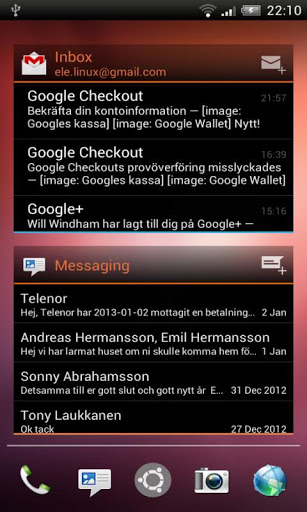
Ubuntu is a custom theme with lot of black backgrounds and ubuntu orange text
[B]What's Themed![/B]
* Framework
* Systemui
* Settings
* Phone
* Browser
* Contacts
* Calculator
* Deskclock
* Playstore
* Launcher2
* Trebuchet
* Novalauncher
* hololauncher HD
* Mms
* RomControl
* Tapatalk2
* Gmail
* Geniewidget
* Torch
* Twitter
* Facebook widget
* Lockclock
* People app
* + some more applications with icons and colors


Ultimate Now Apex Nova Theme 1.7

Ultimate Now Apex Nova Theme
$1.99 BUY
Ultimate Now Theme is a brand new premium launcher theme for Nova Launcher, Apex Launcher, ADW Launcher, SS Launcher, and others.Ultimate Now Theme features fully custom-designed Google Now style icon pack(s), supporting launcher graphics, and multiple wallpapers with multiple colors and shades, allowing you to customize this theme perfectly to your tastes.
BRIONICthemes Elite themes are paid-only themes, thank you for your support!
ULTIMATE NOW THEME APEX NOVA LAUNCHER THEMES FEATURES:
+ Ultimate Now Stock Icon Pack - Now theme features 600+ minimal icons, with a custom designed stock icon pack, 100% re-designed from scratch with minimalist Holo style, featuring original app colors and icon backgrounds implementing colors from each individual app icon's Play Store feature graphic.
+ Ultimate Now Google Style Icon Pack - This theme also features a custom designed white Google Now-widget inspired icon pack, ultra minimal with custom Google Now inspired colors (grey, red, blue, green, and yellow) based on each icon's individual style.
+ Ultimate Now Wallpaper Pack - Now theme features eight 100% custom-designed wallpapers, inspired by minimal style and Google Now city headers. This exclusive wallpaper pack features: Lakeside Day, Pink Peak Sunrise, Purple Mountain Night, Sunset Glow, Glacier Blue, Austin Sunny, Austin Sundown, and Now Who? - London (Doctor Who style). More wallpaper designs (London, Beach, etc) will be added soon!
+ Now Wallpaper Picker - Built-in wallpaper picker for quick and easy wallpaper selection, simply press Menu > Wallpaper > Scroll and select theme wallpaper > Apply!
+ Full Apex Launcher Supporting Graphics - Now theme features full graphical support for Apex Launcher, including all Apex settings icons, dock bars, and tab backgrounds.
+ Theme Your Whole Phone - Matching Ultimate Now Themes for GO SMS Pro (and more coming soon) also available here in the Google Play Store: http://goo.gl/aLk56
DIRECTIONS / INSTRUCTIONS:
This is a theme (like a skin), it will not Open on its own, you need to apply it using a launcher app.
To Apply full theme using Apex Launcher:
Open Apex Launcher > Press Menu > Theme settings > Scroll to theme > Apply
To Apply full theme using Nova Launcher:
Open Nova Launcher > Press Menu > Nova settings > Look and feel > Icon Theme > Scroll to theme > Press
To Apply theme using ADWLauncher / ADW Launcher EX:
Open ADW > Press Menu > ADWSettings > Themes > Scroll and select theme > Apply
To Apply theme using SF Launcher (perfect SS Launcher theme :)
Open SF Launcher > swipe left Menu > App List > Icon Pack > Select theme


Best Photo Editor Photoshop Ed 1.0.4

Best Photo Editor Photoshop Ed
$1.29 BUY
Best Photo Editor is the most powerful photo editor to enhance your photo with various amazing effects, paint your photo with single touch, capture photo with great celebrity & different nature beauty, adding stickers & texts on photo, color enhancement facility & many more.. Share your photo with friends and enjoy their wow expressions!! This is PRO version of our "Photoshop Effects" application which contains all banners unlocked and there is no in-app purchase in this PRO version. :)★ Features ★
- Easy to use, one touch features for all kind of users beginners to professionals.
- Get your own unique effect from unlimited combinations of in-built given effect and color & filter combinations.
- Supported in all languages which are available on Play store like English, Danish, Japanese, German, Hebrew, Chinese, Finnish, Dutch, Polish, Korean, Norwegian, French, Czech, Spanish, Italian, Portuguese, Russian & Swedish.
★ POWERFUL PHOTO EDITING TOOLS ★
- Use Paint brush tool to paint your photo with single touch of your finger with any color, transparency, emboss or grayscale effect in particular area with zoom, undo, redo, etc. options.
- Capture your photo at great places from our photocam in different nature beauty, frames, etc. like photofunia site in offline mode without internet.
- Capture your photo with great celebrity by our photocam tool.
- Change your photo with effective hair styles, eyes, caps, moustaches, specks, lips, tattoos, hearts, emotions, fun, etc. from our library.
- Add gallery photo or captured photo on your main image and club it with transparency.
- Add text on photo with effects, color, custom fonts & give opacity to it for better visualization as needed.
- Get your text in different word balloons in which you can set custom colors for balloons.
- Rotate, zoom or pinch added photo/text on main images using your two fingers.
- Long touch functionality on added images/text on photo to get more options like flip, copy & flip and delete.
- Crop & Rotate features
- Flip horizontal & vertical features
- Mirror effect in all four directions left, right, top & bottom.
- Undo/Redo options in main screen to get previous effect after applying new effect for better management.
★ AMAZING EFFECTS ★
- Get sketched photo from your original photo like pencil drawing.
- Get reflection of your photo like shadow of your photo at bottom.
- Half photo in water reflection
- Full photo in water reflection
- Sun
- Rainbow
- Split
- Sepia
- Tint
- Boost
- Snow
★ ARTISTIC EFFECTS ★
- Smoothing
- Mean removal
- Cartoon painting
- Edge detect, edge highlight & filter
- Polar to rectangular
- Invert in circle
- Grow
- Shrink
★ FILTER EFFECTS ★
- Motion
- Fun
- Sharpening
- Emboss
- Noise
- Round shape
- Marble
- Twirl
- Circle
- Posterize
- Tritone
- Dissolve
★ ADJUSTMENT EFFECTS ★
- Brightness
- Contrast
- Saturate
- Gamma
- Blur
- Shear
★ COLOR EFFECTS ★
- Grayscale
- Black & white
- Invert
- Negative
- Shadowing
- And lots more...
★ COLOR ENHANCEMENT ★
- Enhance colors of your photo using HSB, RGB & CMYK options.
★ History option to view and delete past saved images in 3D gallery view & thumbnail view via our app.
★ You can set photo as wallpaper designed in our app.
★ Provided help screen to elaborate meaning of icons & how to use app.
★ Click on Menu button on Android phone to get more options about the app.


WhatsApp plus v3.30

WhatsApp plus v3.30
Free
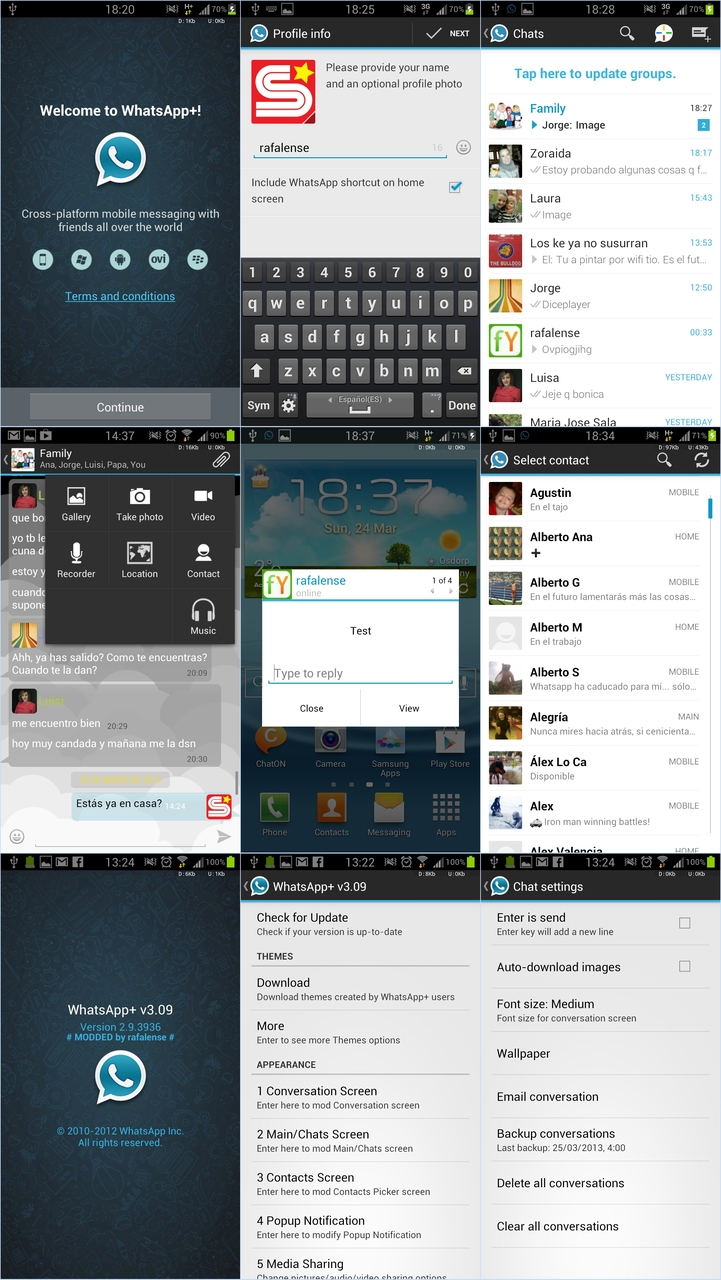
Basically it is a customizable WhatsApp where you can change lots of colours, sizes, and many other visual MODs
In addition you can increase upload media limit (stock limit is 16Mb) to send large music files or videos
You can increase quality of pictures sent (by default resolution is decreased quite a lot)
You can share music just with one click
You can add contact profile pictures to their chats
You can hide contact profile pictures and show phonebook pictures (in chat screen)
Built-in theme viewer and downloader. Check WhatsApp+ users themes online and apply theme if you like
And more to come

Test it! It's free