Ultimate Call Screen HD 9.5.1


Ultimate Call Screen HD
$4.99 BUY
Ultimate Call Screen HD Pro License
This is the license to remove the contact limit and unlock all features of Ultimate Call Screen HD Lite version.
Note that this app is the license only, you need to install Ultimate Call Screen HD, and all features will then be unlocked on that app. This app does nothing by itself!

The most complete caller ID replacement and phone toolbox on Google Play, feature leader on its class. UCS combines a Fullscreen Caller ID replacement, Fullscreen SMS Receiver, contact picture manager, call blocker, and, on top of that, sensor-base actions such as rejecting calls by turning the phone screen-down, AND swipe gestures just to be sure you handle your phone any way you want to.
As recommended on www.lifehacker.com:
"The features of this app are almost too numerous to list, but if you use your phone to make phone calls (you know, that thing it was originally intended for), it's a must-have."

In one app, you get:
- Choose pictures from gallery, take from camera or link to Facebook friends using their HD profile pictures
- Apply pictures to contacts directly from your gallery, with the android "share" function. Just choose "Add to UCS"!
- Answer calls with buttons, sliding buttons, rotary buttons, swipe gestures... You choose!
- Configure your phone to hangup calls, put on speaker or mute ringer simply by turning the phone screen-down!
- Swipe gestures (reject and answer calls, reject with sms, reply to sms, ...)
- Call blocker (whitelist, blacklist, block unknown numbers, block selected contacts, block by prefix)
- Fullscreen SMS receiver
- Complete theme support for both call and SMS screens, personalizable per contact
- Picture syncing of HD pictures to phone internal contacts

Advanced Features:
- Use your current android contact picture as fullscreen caller ID (Licensed only!)
- Selectively enable only for outgoing/incoming calls
- Sync your android contact database to use your UCS-defined callscreen HD pictures, or batch-upload a set of pictures from your sdcard
- Theming support for both Call and SMS screens, allowing changing almost everything on the interface
- Each contact can have a different theme
- Hide parts of the call screen for cleaner interface.
- Option to make incoming SMS show above lockscreen, including turning the screen on
- You can Swipe through all your inbox SMS messages, not just the incoming
- "Block Unknown Callers" feature
- "Block by prefix": define up to 3 prefixes and block all numbers starting with them
- You can ALWAYS go back to the default phone interface during a call, simply by pressing the phone "Back" while on a call
- Much MUCH more! Take a look through the available settings!

Snark Busters: High Society 1.0

Snark Busters: High Society
$2.99 BUY

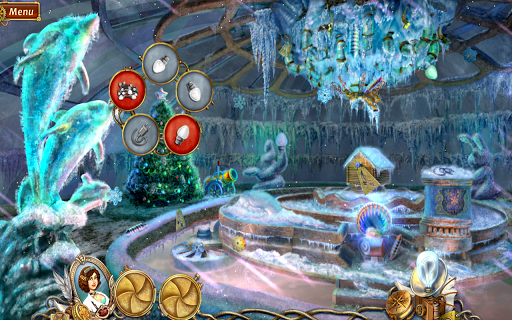
Test your wits with mind bending puzzles and extreme hidden object fun in Snark Busters: High Society! Solve a devious crime, one that has been pinned on an innocent person. Bring light to the truth, and solve the mystery once and for all. Let your inner detective out, and save the day!
This intense tale of love, envy, and revenge will have you firmly planted in the story and won’t let go until the very end. You will be tasked with solving challenging puzzles that would leave anyone else scratching their head. Travel through mirrors to worlds completely backward, and speak with charming ghosts who will give you quests to play through to advance the story and thicken the plot. It’s time to play, and catch the Snark!
GAME FEATURES:
• Extremely intense, thrilling chapters!
• Spectacular locations full of mystery!
• Challenging mini-games that will test your skill!
• Compelling characters that drive the interesting story!
• Step-by-step tutorial to help your investigative ability!


Swype Keyboard 1.5.3.15724

Swype Keyboard
$0.99 BUY

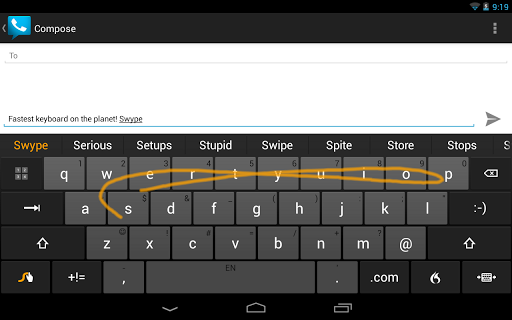
You Asked for It - Swype Now Available on the Play Store! Get it Today - Only 99 Cents - Limited Time Offer!
• 250+ Million Users and Growing
• Guinness World Record – Fastest Time to Type a Text Message
• Own the Original Swype Keyboard that Started it All – Accept No Imitations
SWYPE – YOUR KEYBOARD FOR LIFE:
Swype is all about YOU. Whether you’re a Swype'r, a Typer, a Tapper or a Dictator, get ready for a better, faster keyboard experience that gets smarter the more you use it. Swype pays attention to the way you input text and creates a personal language model that follows you from device to device. Swype – the world’s most powerful keyboard.
SWYPE KEYBOARD FEATURE EXCLUSIVES:
SWYPE LIVING LANGUAGE crowd-sources and updates your dictionary with the latest trending words. Imagine having instant access to the hottest the words and phrases that people are using at that moment. Swype’s Living Language will also further localize your dictionary with an additional dialect supplement for your preferred language. (Opt-in feature)
NEXT WORD PREDICTION is so intelligent it's like Swype can (almost read) read your mind. The most powerful personal language model on the market trains your device to learn your unique vocabulary and predict your words based on previous usage. Swype also has the most extensive phrase and sentence based prediction model out there, which means we can predict words in commonly used long phrases like “Best of the Best,” “Nail on the head”, “Girl with the Dragon Tattoo,” and “Dancing with the Stars.”
PERSONAL DICTIONARY BACKUP & SYNC makes it so your Swype dictionary and how you use your words, follows you from device to device. (Opt-in feature)
DRAGON DICTATION’S world-renowned voice recognition lets you go hands free and turns your voice in to text quickly and accurately with a simple press of the Dragon key. Available in 36 languages.
SMART EDITOR analyzes an entire sentence, flagging potential errors for a quick fix, and includes suggestions for the most likely alternatives.
Even more personalized and intelligent Swype features:
• Multi-modal: Swype, Type, Write, Speak
• Dragon Mobile Assistant: Dragon Mobile Assistant now integrates into the Swype keyboard! If you have both apps on your Android you can quickly launch Dragon’s hands-free and always-available mobile assistant directly from the Swype keyboard with one easy gesture. Just Swype from the Swype Key to the Dragon flame short cut on your keyboard and Dragon’s Jarvis-like assistant is at your command! Available with Swype version 1.5 and Dragon Mobile Assistant version 3.1 and above.
• Unique Tablet Keyboards: Don’t pay double, a single keyboard for both phones & tablets. Swype includes three tablet modes to choose from, including: the original Swype keyboard, a small and moveable keyboard, and a split keyboard for easy tablet input.
• Smart Touch: Swype learns your unique style of input and continuously evolves and adapts to your typing patterns for a truly personalized keyboard experience.
• Language Downloads: Swype supports 60 downloadable languages and 20 dialects.
• Keyboard Themes: With a wide variety of themes to choose from, you can personalize the look of your Swype keyboard to one that is all your own.
• Voice & Text Dictionary Sync: New words added to your Swype keyboard personal dictionary are synced across all input methods, which means that you can easily Swype, type or Dragon dictate that new word.
• Gestures: Because sometimes you just want a fast shortcut for everyday tasks like: capitalization, punctuation and text editing (such as Select All, Copy, Paste – and, even language switching)


Light Flow - LED&Notifications 3.7.0

Light Flow - LED&Notifications
$2.14 BUY

Light Flow allows you to take control of your notification LED colors and makes them successively flash one color after another.
It also allows you to set repeating sounds on vibration patterns for you notifications. You can also set a "sleep" mode or "on charge" where the lights and/or sounds and vibrations will not be heard or seen. If you've come from a Blackberry device and miss the features of BeBuzz / BerryBuzz then give LightFlow a try!
This program will allow you to control the notification color for the over 550 applications and system events such as:
* Missed calls
* Voice mail
* Calendar reminders
* gmail
* email
* SMS messages
* MMS messages
* Low battery
* No signal
* Google talk
* Facebook
* Twitter
...and many many more
See our website for a full list of applications supported:
http://www.folioflow.com/ff/page/website/lightflow/pageId/1687

It allows the colors to flash in succession, so if you have a new SMS and a missed call it can alternate between the two colors. You can also set which notification type has the highest priority and let it flash in just that one color.
It'll even push notifications out to your pebble smart watch and the DashClock lock screen extension.

For a full changelog see here: For a full changelog see here:
https://www.folioflow.com/ff/page/website/lightflow/pageId/1693
For a full list of permissions required and why see here:
http://www.folioflow.com/ff/page/website/lightflow/pageId/2277
Known issues/Limitations
-------------------------
Samsung phones when accessibility is enabled may cause the phone to start talking, warnings about air view and a few other issues. These are confirmed samsung bugs (see here: http://developer.samsung.com/forum/board/thread/view.do?boardName=GeneralB&messageId=204387) but the app can be run without the accessibility service and still work (but with a reduced notification list)

Not all phones support all colors.
For example: Most HTC phones only support 3 colors and require "Rooting" and running the app in "direct mode"
Some phones can only light up the notification while the screen is off.
Some phones cannot have their notification light always on
Some phones cannot have their notification blink and it will always be on
Note that it will take over control of your notifications and you will therefore only get notifications for categories that the app allows.

★ We recommend you try the "lite" version first before purchasing to avoid any disappointment if it doesn't work for you. Some phones require root privileges to access the LEDs. ★
★ For the differences between this version and the lite version see here: http://www.folioflow.com/ff/page/website/lightflow/pageId/1687
★ If after updating you have problems we recommend you reboot your phone ★
** Most HTC phones require "direct mode" setting. Most gingerbread builds for HTC phones require root access due to HTC changing the permissions on the LED control files. **
** If upgrading from the "lite" version, please uninstall the lite version first but you can backup and restore settings between versions **

Falcon Pro (for Twitter) 1.9a


Falcon Pro (for Twitter)
$1.86 BUY
Falcon Pro brings the Ultimate Twitter Experience to your Android Phone and Tablet.
Looking for a Twitter app with an Innovative UI, Buttery animations, Extra fast loading times and Unique Features ? Look no further, Falcon Pro is what you need.
::::: Falcon Pro Features :::::
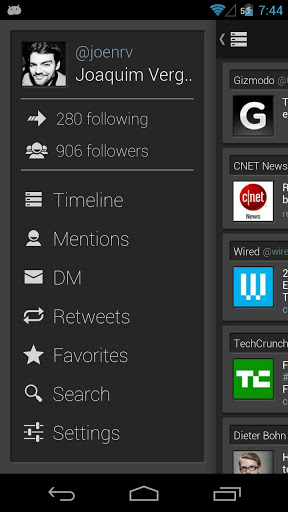
* Double Sliding Menu UI like you've never seen before
* Beautiful Phone and Tablet UI
* Extra smooth scrolling
* Real Time, Expandable notifications
* Super fast internal browser with Instapaper integration
* Offline favoriting
* Tweet Drafts
* Inline preview of Photos and Videos
* TweetMarker support to use on multiple devices
* In-app preview of Play Store links
* Zoomable pics
* See your most popular tweets
* Fast access to Saved Searches and Lists
* Embedded Youtube player
* Dark & Light themes
* Inline preview for links and articles
* Offline access to your favorite users
* Individual user notifications
* Scrollable widget
* Quick Actions widget
* Full offline mode !
+ All core features you would expect from a mobile Twitter client, and much more.
Falcon Pro is fast and smooth on phones and tablets running Android 2.2 and above

Business Calendar 1.3.2.3

Business Calendar
$4.99 BUY
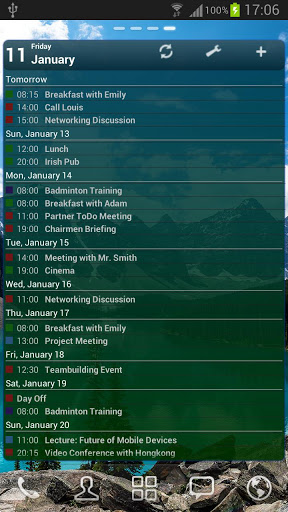
Business Calendar is a complete calendar application that is synchronising with your Google calendars!
* smooth scroll- and zoomable multi-day view (1-14 days)
* graphical and textual presentation
* month, agenda, day and event view
* color-coded year view
* quickly fade in/out calendars using the favorite bar
* search function
* drag&drop functionality
* configurable widgets in different sizes for month, week, agenda and day view
* easy switching between timeline bars and event titles in month view
* intuitive new handling option: just move your finger over some days of interest in month view to open them in the multi-day view
* quick day overview when adding a new event
* many options for recurrent events (e.g. to add a recurrent event that takes place every other week on Tuesday and Thursday)
* option to link a contact to an event
* option to create templates for events
* multi-selection mode to delete, move or copy multiple events at the same time
* configurable font sizes for the app and the widgets
* option to select individual calendars for each widget
* 11 different widget design themes
* light and dark theme for the app
* import/export function for calendar files in the popular iCalendar format (.ics, .ical)
* context-sensitive help system to optimize your work with Business Calendar
There also is a free ad-supported version of Business Calendar (called Business Calendar Free), we recommend to test the free version before buying the paid one.
Please do not move the application to the sd card if you want to use the widgets (general limitation of the Android operating system)!
You can use our own Business Calendar reminders or the reminders of the stock calendar application to get alarm messages for your events! If you use our own reminders please remember to disable the alarm messages of the stock calendar application!