Moon+ Reader Pro 1.9.6.2


Moon+ Reader Pro
$4.65 BUY

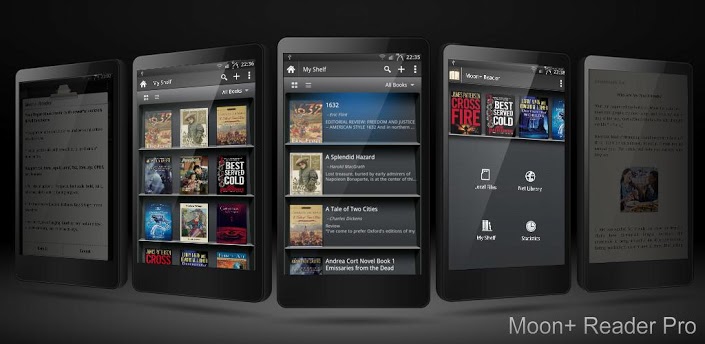
New designed book reader with powerful controls & full functions, supports epub, pdf, mobi, chm, cbr, cbz, umd, fb2, txt, html, rar, zip or OPDS formats.
☀Additional benefits in pro version:
✔ Ad-free, faster & smoother
✔ Shake the phone to speak (Text-to-speech, TTS engine support)
✔ PDF support, fast & speech compatible
✔ Reading statistics function
✔ More beautiful themes, background images and fonts
✔ Customize reader bar function
✔ Headset & Bluetooth keys control
✔ Multi-point touch support
✔ Option for password protection at startup
✔ Book to home screen shortcut
✔ Annotations, highlights & bookmarks share support
✔ Open/Backup/Sync/Download/Upload book files via Dropbox
✔ Customer email support
☀PDF features in Pro version:
✔ Fill out PDF Form
✔ Highlight, annotation, handwriting
✔ Smart scroll lock, smooth reading experience
✔ Night mode support, 6 additional pdf themes available
✔ Dual-page mode for landscape screen
✔ Speech, auto-scroll compatible
✔ Read statistics, sync, flip animation available

☆The key features:
• Support online ebook libraries and personal calibre ebook server.
• Read local books with smooth scroll and tons of innovation.
☆Standard functions:
• Full visual options: line space, font scale, bold, italic, shadow, alpha colors, fading edge etc.
• 10+ themes embedded, includes Day & Night mode switcher.
• Various types of paging: touch screen, volume keys or even camera, search or back keys.
• 24 customized operations (screen click, swipe gesture, hardware keys), apply to 15 customized events: search, bookmark, themes, navigation, font size and more.
• 5 auto-scroll modes: rolling blind mode; by pixel, by line or by page. Real-time speed control.
• Adjust the brightness by sliding your finger along the left edge of the screen, gesture commands supported.
• Intelligent paragraph; indent paragraph; trim unwanted blank spaces and lines options.
• Keep your eyes health options for long-time reading.
• Real page turning effect with customized speed/color/transparent; 5 page flip animations.
• My Bookshelf design: Favorites, Downloads, Authors, Tags; self bookcover, search, import supported.
• Justified text alignment, hyphenation mode supported.
• Dual page mode for landscape screen.
• Support all four screen orientations.
• Backup/Restore options to cloud via DropBox, sync reading positions between phones and tablets.
• Highlight, Annotation, Dictionary (Offline or Online, support ColorDict, GoldenDict, Fora, ABBYY Lingvo, etc.), Translation, Share functions all in moon+ ebook reader.
• Localized in 40 languages: English, አማርኛ, العربية, հայերեն, Български, català, český, dansk, Nederlands, eesti, suomi, français, galego, საქართველოს, Deutsch, ελληνικά, עברית, magyar, Indonesia, italiano, 日本語, 한국어, македонски, persan, polski, português, português brasil, român, русский, српски, 简体中文, slovenských, slovenskega, español, Svenskt, 繁體中文, ภาษาไทย, Türk, Український, Việt
-Tags: book reader, ebook reader, pdf reader, ebook speech, pdf annotate form, epub, mobi, pdf, rar, moon reader pro, ibook, stanza, kindle, nook color, aldiko HD, kobo, comics, comic reader, cbz reader


Super Keyboard Pro

Super Keyboard Pro
$2.99 BUY
Super Keyboard is a better alternative keyboard for your android phones and tablets! We are dedicated in making Super Keyboard the best keyboard for android.
TOP FEATURE
- Smart proximity error detection and correction, help you type faster than using any other keyboards,
**TRY IT OUT YOURSELF**
- True multi-touch capable
- Large keys! You can even make them taller if you want.
- Enhanced layouts for both phones and tablet devices: includes compact and T9 layouts for phones and
split layout for tablets. **Press and hold ?123 key to quickly switch between layouts**
- Themes! Compatible with many keyboard theme format: GO Keyboard, Better Keyboard, Smart Keyboard, ultra keyboard, etc
- Customizable keyboard background, set your keyboard background to any image you like
- Support many languages, more are coming soon
- Customizable fonts and color, compatible with all font packs on the android market.
You can also load fonts from your sd card.
- Alien Text: find it under ‘General Setting’ -> ‘Alien Text’
- Enhanced setting, customize your keyboard the way you like it: gesture, keyboard size,
user dictionary and sound

Supports Languages:
Czech, Simplified Chinese, Traditional Chinese, Danish, Deutsch, English, Espanol, Finnish, French, Hungarian, Italiano, Japanese, Korean, Netherlands,
Norwegian, Norwegian (Bokmål), Polish, Portuguese, Russian, Slovenian, Swedish
Permissions explainations:
SD Storage - download additional contents, such as theme files
Internet Access - check latest update, notification when new version is available
Read contact - contact dictionary: suggest names from user contacts


Dr.Web Anti-virus Life license 8.00.0


Dr.Web Anti-virus Life license
$75.00 BUY
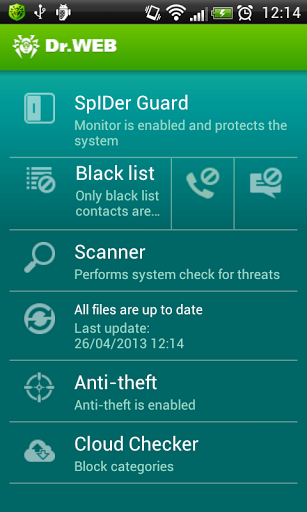
Comprehensive protection from all types of threats for mobile devices with "lifetime" support.
Use Dr.Web for Android free of charge.
Users of Dr.Web Security Space or Dr.Web Anti-virus are entitled to use Dr.Web for Android (comprehensive protection) FREE OF CHARGE.
Features and Advantages
• Quick or full file system scanning, as well as custom scanning of files and folders specified by the user.
• Real-time file system scanning with SpIDer Guard monitor whenever attempts are made to save files to the device’s memory.
• Detection of new, unknown malware using the unique Origins Tracing™ technology.
• Protects the SD card from becoming infected with autorun and Exploit.Cpllnk files, which can be dangerous for devices running Windows.
• A quarantine to which detected threats can be moved and from which files can be restored.
• Minimal impact on OS performance.
• Careful use of battery resources.
• Small-sized virus database updates to save traffic, which is especially important users with limited mobile phone plans.
• Statistics on detected threats and actions performed.
• Handy and informative desktop widgets to access the application.
Anti-spam
to avoid unwanted calls and SMS messages.
• Select the calls and messages filtering mode.
• Create your own filtering profiles.
• Edit your black list (block incoming calls and messages from certain numbers).
• View blocked calls and messages.
Anti-theft
Helps you find your mobile device if it has been lost or stolen and, if necessary, will wipe your confidential information from the device remotely.
• Device blocking after a reboot
• Lock the device so that it can be unlocked only by entering a password (limit the number of unlock password enter errors)
• Unlock the device with an SMS message.
• View the device's location on Google Maps.
• Remotely erase data on the device and SD card.
• Set the device’s speakerphone volume to loud and lock the screen.
• Customize the message to be displayed on the screen of the blocked device.
• Create a list of numbers to which notifications will be sent when the SIM card on the lost device is changed. You will be able to control the anti-theft by sending messages from these numbers and unlock the device if you have forgotten the unlock password.
Cloud Checker
Cloud Checker will protect you from unwanted Internet resources. Block access to non-recommended or potentially dangerous sites in the following categories:
• Drugs and narcotics;
• Known sources of viruses ;
• Abusive language;
• Terrorism;
• Violence;
• Weapons
• Adult content, etc.
How to remove Dr.Web for Android with installed anti-theft
Before removing the Dr.Web anti-virus, go to Administration. Under Security, clear the Dr.Web Anti-virus option.

Dessert - GO Launcher Theme v1.1


Dessert - GO Launcher Theme
FREE
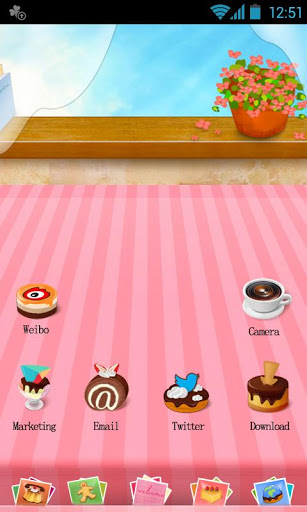
A brand new FREE theme for GO Launcher EX.

Brief Introduction
Specially designed for GO Launcher EX, provides delicate app icons, wallpapers, folder and app drawer interface. Get it right now and have a completely new makeover of your Android smartphone.
Notice:
GO launcher theme is only available for phones with GO Launcher EX installed.
Search “GO Launcher EX” on Google Play Shop and install it for free.
***How to Apply the Theme
1. Directly open the theme after successful installation.
2. or back to Menu>Theme, choose a theme you like and apply it to your phone.

FPse for android 0.11.99

FPse for android
$3.49 BUY
FPse for Android is the fastest and most compatible PSone emulator for handheld devices.(also known as PSX or Playstation 1)
More than 200.000 active users and rated up to 4,5 stars on google play!

FPse is able to render PSone games in high resolution by using OpenGL which gives outstanding graphics!
Take a look to the Official Documentation to understand requirements and how it works:
http://www.fpsece.net/faq.html
Create an ISO image from your favorite games and enjoy playing them on your Android phone.
FPse features the following:
-Impressive UI which scan and draw covers games automatically!
-High performance
-High compatibility
-High sound quality
-Real-time save states
-Audio track emulation (using .cue files)
-Force-feedback
-Dynamically loadable Overlay Pads
-Guncon emulation
-Analog Stick emulation
-Compatible with G-Sensor, Touchscreen and Hardware keys
-Supports .img, .iso, .bin, .cue, .nrg , .mdf and .Z disc image formats
-Full Support for IcontrolPAD, BGP100,Zeemote (via Bluez IME)
- Full native support for Xbox 360 pads, PS3 Sixasis pads and MOGA controllers!!
-OpenGL support via external plugin!
-Experimental LAN multi Players mode using two Android devices! Play with two players mode with games that wasn't made for that! IE: Tekken3!
-Exclusive automatic cheats search engine.
And much more impressive features!
From the new UI you can load and share covers and even compress games...


Toucher 1.5.2


Toucher
FREE
V1.5.2
We've heard from your feedback and do our best to solve this point disappearing issue. Now we released v1.5.2 to work this out. Also reduce package size to normal level.
V1.5, two heavyweight features added — Custom panel & theme settings, a new improvement of Setting menu, and solve a favor app missing bug.
#Custom Panel
We’re trying to make Toucher more efficiency, so we offer you various features to choose. Meanwhile, we’ve been told from our users that they would like to change the default cross-like main panel, and move some frequently-used features — such as clean memory and screenshot — to the main panel. Since main-panel is not enough for us to place the feature icon, in that case we let you to DIY — custom panel.
Click the “+” to add or change icon.
Long press to remove the icon.
Find the Custom Panel feature entrance at:
1. Default theme – Touch – Custom Panel
2. Toucher Settings – Custom Panel
#Theme Settings
‘Blue Light’ was a hit, and more themes are on their way. In that case, we make a new theme setting interface of Toucher, where you can switch themes you installed, download new themes.
Also we transfer Toucher Settings entrance to the right corner of Theme settings. Don’t miss it~

#HOW TO HIDE THE POINT
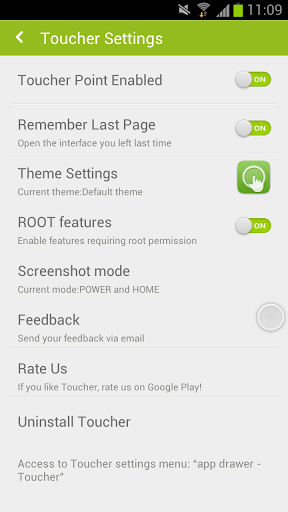
app drawer - Toucher - Toucher Point Enabled, turn off.
Toucher, enhanced version of TouchHelper, more themes and more features!
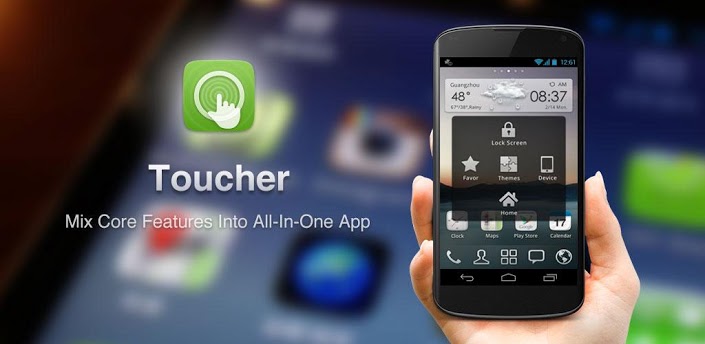
Toucher is a tool application specially designed for Android devices. We expanded the concept of the iPhone AssistiveTouch, and redesigned for the Android devices, both mobilephones and tablets. Toucher gathers most commonly used and needed features of Android system in this suspending point.
Besides, we're taking further steps on personalization and trying our best to bring you more themes, it may appears just like another suspending frame, or a full-screen theme(like what we did in WP theme and TouchHelper default theme"colorbar"), also the point skins. And we're aiming at being better than Assistive Touch. So, just try this on and keep focus on Toucher!
#How to switch theme
"App drawer - Toucher icon - theme settings"
#How to uninstall
"App drawer - Toucher icon - Uninstall"
or "default theme - Touch - Uninstall"
(Once you activate lock screen feature, you cannot uninstall Toucher in app drawer directly.)
#Feature lists:
*Lock Screen
*Home - Long press to open recent app list
*Favor app
*Device switches (eighteen types in total)
*Menu: right now you can change themes and uninstall Toucher.
*Clean up memory
*Recent apps
*Themes: colorbar, WP